

A perfect
Resume Summary
Gets More Interviews
Tailor your resume
for any job in seconds!

What Is a Resume Summary?
A resume summary is a short, high-impact section at the top of your resume that highlights your most relevant experience, skills, and achievements. It’s your elevator pitch—in bullet form.
Most job seekers either skip this section or write one that’s too vague to make an impression. Done right, your summary can immediately show the hiring manager that you’re a strong fit.
Think of it as a scannable preview that assures the recruiter and hiring manager: “Keep reading. This candidate could be our next hire.”
- What sets you apart (achievements, certifications, outcomes)
- Who you are (e.g., experienced project manager, entry-level designer)
- What you bring to the table (skills, tools, industries)
In hiring, first impressions count a lot
A strong resume summary (also called a professional summary) is one of the most powerful tools a job seeker can use to quickly capture a recruiter’s attention. It’s the first thing hiring managers read and often determines whether they keep reading—or move on.
In today’s hyper-competitive job market, a clear and targeted summary can be the difference between landing an interview or being overlooked.
Why Your Resume Summary Matters More Than Ever
Recruiters spend just 7 seconds scanning a resume. ATS systems do it even faster. If your summary doesn’t connect immediately to the job description, you won’t get a second look.
A clear, targeted summary helps you:
- Show instant alignment with the role
- Highlight and surface the most relevant keywords
- Encourage the recruiter to keep reading
- Stand out—even if other candidates have similar experience
At Jobalope, we help you generate summaries that match the job description—so both bots and humans see you as a great fit.
What to Include in a Great Resume Summary
The best summaries are short (3–5 bullet points), specific, and directly relevant to the job. Here’s what to include:
- Job title or role you’re targeting (mirroring the job post)
- Quantity of relevant experience, either in years or described with an adjective (e.g., “Deep experience in…,” or “Extensive experience with…”)
- Core technical skills that are critical for the role
- Notable achievements, especially those with measurable outcomes
- Industry or domain expertise that aligns with the role
Optionally:
Certifications or degrees, but only if they’re required or clearly strengthen your candidacy
Resume Summary vs. Objective Statement
A resume objective focuses on what you want.
A resume summary focuses on what you offer.
Example of an objective (outdated):
“Looking for a challenging role in software development to grow my skills.”
Better: Resume summary in bullet format:
- Full-stack developer with 5+ years of experience in SaaS and eCommerce
- Skilled in React, Node.js, and PostgreSQL
- Led launch of new checkout system that improved conversion by 18%
- Strong communicator and team collaborator
- Bachelor’s in Computer Science from UC Davis
How to Write Your Own Resume Summary (Step-by-Step)
Follow these steps to write a personalized, effective summary:
- Identify your target role
Use the exact job title from the job posting. - Review the job description
Highlight the required skills, tools, and deliverables. - List 3–5 relevant bullets
Focus on what you’ve done, not just what you know. - Use specific, active language
Replace vague buzzwords with real achievements and impact. - Tailor it for every application
Don’t copy-paste—Jobalope automates this for you.
Use Jobalope to Generate the Perfect Resume Summary
Here’s how Jobalope helps you get a perfect, effective summary:
- Paste your resume and job description
- Our AI scans both and generates a personalized, ATS-ready, perfect summary
- Edit or regenerate in seconds
- See which keywords you’re missing—and where you match
With Jobalope, you can apply to 10 jobs in an hour, each with a targeted, professional summary that gets attention.
Make It ATS-Friendly
Even the best summary won’t help if the software can’t read it. To keep your resume summary ATS-safe:
- Use standard job titles (e.g., “Project Manager,” not “Project Maestro”)
- Avoid using first-person language (“I,” “my,” “me”)
- Match keywords from the job description
- Use plain formatting—no graphics, icons, or unusual fonts
- Keep it to 3–5 tight bullet points
Frequently Asked Questions
about our Resume Summary Generator
How long should a resume summary be?
Stick to 3–5 bullet points. Each bullet should communicate something relevant to the job, whether it’s experience, skills, or results. Keep it tight and targeted.
What if I have multiple career paths (e.g., marketing and project management)?
You can tailor your resume summary to each job you’re applying for. Create one version for each type of role, emphasizing the most relevant aspects of your experience for that field.
Is it okay to mention soft skills in a resume summary?
How often should I update my resume summary?
Ideally, every time you apply for a job. Use the opportunity to align your skills and experiences with the job description to help the recruiter see that you’re a great fit at a glance.
Is Jobalope’s Resume Summary generator really free?
Yes! You can generate an ATS-optimized resume summary for free. To unlock full access to customization, expert scoring, and cover letters, upgrade to Jobalope+ Plus.
Will this help me get more interviews?
A great resume summary massively improves your chances of the recruiter considering that you may be their hire, so yes! — Our users consistently see better results when including a resume summary.
Can I edit the Generated Resume Summary?
Absolutely. Once your new resume is generated, you can edit it directly in our resume builder to fine-tune any details.
Why it’s harderto get interviews today
andwhat you can doabout it.
Whytailor your resumeto the job description?
In a tough job market, you need to be the perfect fit.

800
people
apply


100
resumes
reviewed

15
candidates
interviewed

1
job seeker
hired
What our resume scanner tool checks For?
Our resume scanner checks for a variety of factors, including:
01
Typos and grammar errors
Advanced algorithms identify and correct inconsistencies, refine tone, and streamline language.
02
ATS-friendly formatting
The tool optimizes resumes for compatibility with applicant tracking systems (ATS), ensuring improved readability, correct date formats, and compliance with employer-preferred conventions.
03
Word choice
The resume scanner highlights, suggests and integrates more impactful, concise, and relevant word choices to better showcase qualifications.
04
Keywords
The resume tool strategically integrates relevant keywords to improve ATS performance and help the resume stand out to recruiters and hiring managers.
05
Eye-catching resume summary
The tool assesses your resume’s areas of strength and adds a summary to better align it with the job description’s requirements. This ensures that recruiters and hiring managers see your best qualifications at a glance.
06
Completeness and organization
The resume scanner ensures that all essential sections are complete, and that the all the information is clear, cohesive, and aligned to illustrate maximum fitness for the role.
What our Customers
are saying
★★★★★
4.4 from 1,400+ customers
“Reduced the Time
and Stress”
“After applying to job after job, the task of creating a cover letter and version of my resume that matched the job description was overwhelming and exhausting. Jobalope greatly simplified the process and reduced the time and stress involved – and at a very reasonable price!”
Robin King
Leader in Genomics and Oncology
★★★★★
“Efficient”
“Jobalope is a game-changer! The AI made my job search so much easier and more efficient. Highly recommend it!”
Rachel Stevens
Marketing Manager
★★★★★
“Helpful”
“Jobalope helped me to finally ‘just get it done.’ Upgrading my tools is always a great investment!”
Javier Coros
Business Intelligence Analyst
★★★★★
“Easy”
“Thank you! I was struggling with targeting my applications. The personalized cover letter and resume tools make it easy.
Michael Lee
Project Manager
★★★★★
“Quick”
“Using Jobalope was a breeze. The platform made creating tailored resumes and cover letters quick and easy. I couldn’t be happier!”
Emma Davis
Human Resources Generalist
★★★★★
Resume Scanner, Resume Checker, Resume Builder…? What’s the difference?
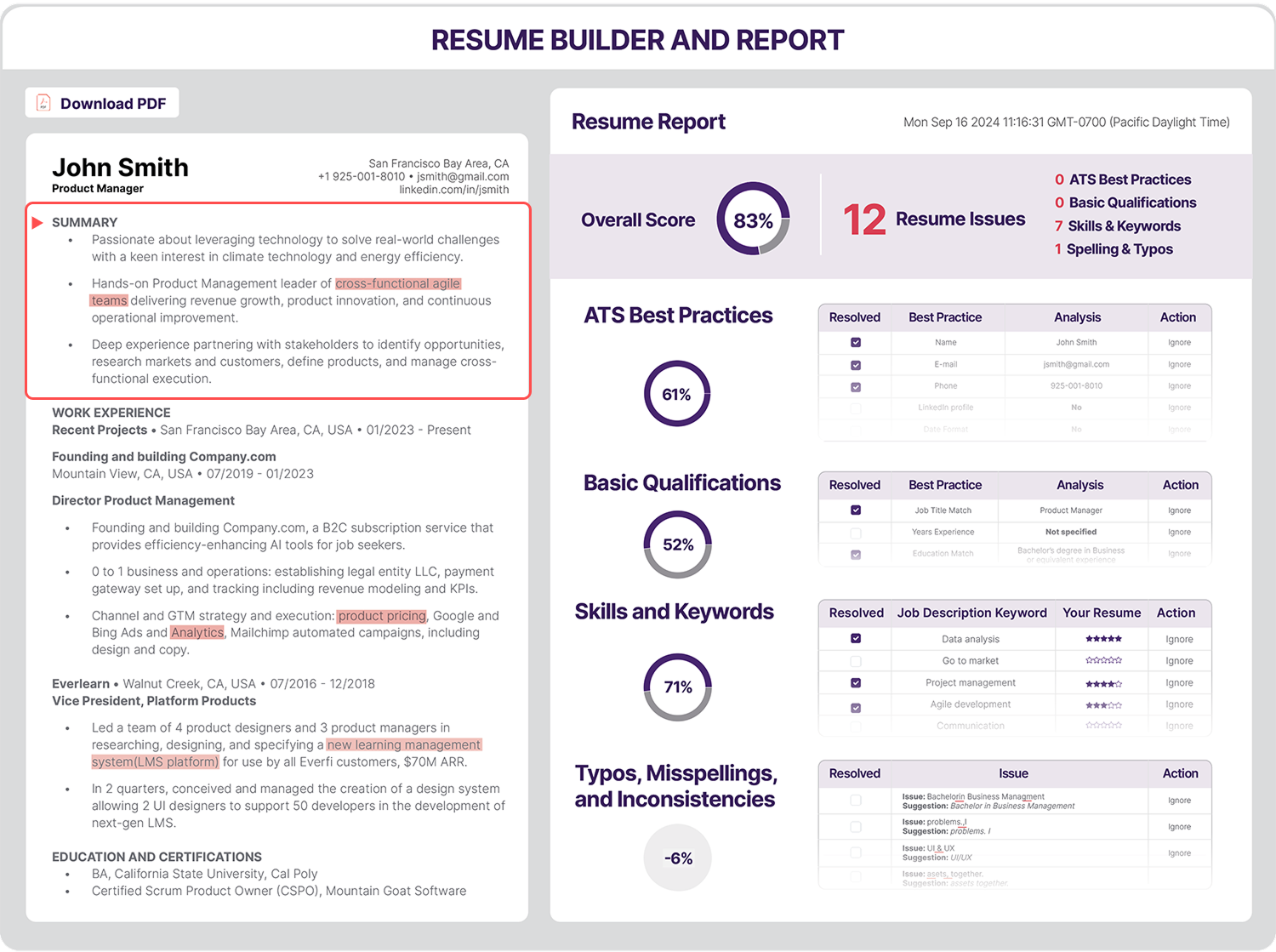
The Jobalope Resume Builder contains all three in one seamless workflow. We don’t like to complicate things, so we just call it the Resume Builder in our navigation and page titles. For the curious, here’s what each does and how they fit together
Resume Scanner
Paste in your existing resume and job description, and the Resume Scanner immediately parses every section—contact info, work history, skills, dates—into a clean, structured data model. No more lost bullets or mangled formatting.
Resume Checker
Once scanned, the Resume Checker analyzes your draft for:
- Relevance: Benchmarks your keywords and achievements against the job description to spotlight gaps and highlights. You get a clear, actionable report showing exactly what to fix and where to focus.
- Correctness: Flags grammar errors, formatting inconsistencies, and ATS‑unfriendly elements.
Resume Builder
Using that report, the Resume Builder generates an enhanced version—optimized language, targeted keywords, and a polished layout.
- In our intuitive Resume Builder UI, you can:
- Download your final resume in PDF
- Toggle between your original and enhanced drafts
- Edit content, swap phrasing, or adjust formatting in real time
Frequently asked questions about the Resume Builder
What is a resume checker and builder?
A resume optimizer is a tool that refines your resume to align with the skills and requirements in the job description, ensuring it’s well-tailored to the role. It also identifies and corrects errors and inconsistencies, resulting in a polished, professional resume that’s optimized for both applicant tracking systems and hiring managers.
Are the resume tools free to use?
Yes! Jobalope’s resume scanner tool is free to use as much as youd like and offers a range of important checks and suggestions. It also includes a builder tool that allows you to download a polished PDF version of your resume at no cost. However, only Jobalope+ Plus offers a polished, perfectly tailored resume that’s ready to send.
How to do I get started with the Jobalope Resume Builder?
Jobalope+ Plus is available in three plans: Weekly, Monthly, and Quarterly. All three plans include the following features:
- Step 1. Paste your full resume into the resume box.
- Step 2. Paste the job description directly from LinkedIn, a company’s career page, or any other source into the job description box.
- Step 3. Click on the Go To Resume Builder button.
Don’t let your resume hold you back. Use Jobalope’s Resume tools today and accelerate your job search with the confidence of a stand-out resume.
What does the Jobalope+ Plus Plan include?
Jobalope+ Plus is available in three plans: Weekly, Monthly, and Quarterly. All three plans include the following features:
- Unlimited auto-tailored Resume’s using the Resume Builder
- Unlimited use of the Job Search Tracker
- Unlimited easy, perfect cover letters
- Unlimited premium Support
Don’t let your job search tools hold you back. Use Jobalope today!